-
Shop
- Adidas
- Advanced Technologies
- AI Skills Mastery 2026 Collection
- Apple Accessories
- Best-Sellers
- Car Accessories
- Dating & Social Confidence
- Dating & Social Skills
- Digital Resources
- Education & Learning
- Family & Parenting
- Fashion
- Fashion Accessories
- Furniture
- Gadgets
- Health & Beauty
- Health & Wellness
- Home & Garden
- Home Supplies
- Kids & Babies
- Kitchen Best-Sellers
- Lighting
- Nike
- Patio, Lawn & Garden
- Personal Growth
- Pet Care
- Pet Supplies
- Pets
- Shoes
- Sport & Outdoors
- Stress Relief & Relaxation
- Summer 2025 Fashion Collection
- Sunglasses
- Super Deals
- Travel
- Travel & Outdoors
- Wealth
- Wealth Building
- Women’s Wellness & Lifestyle
- Popular
- Best deals
Line Anime Gaming Mouse Pad: Smooth Cloth, No-Slip Grip
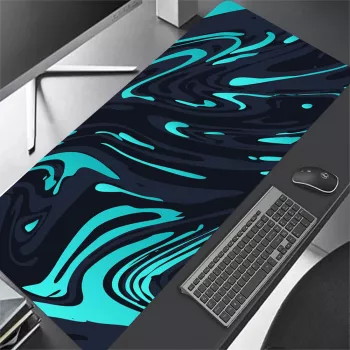
Line Anime Gaming Mouse Pad
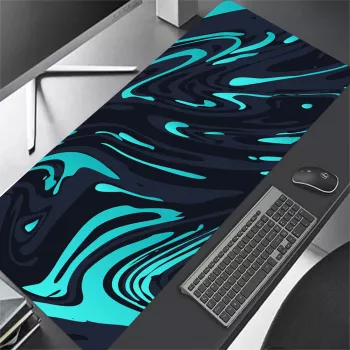
A mouse pad can change how a setup feels: smoother tracking, steadier stops, and a cleaner look on the desk. The Line Anime Gaming Mouse Pad brings an anime-inspired aesthetic to everyday gaming and work while focusing on the basics that matter most—consistent glide on a cloth-style surface and a grippy rubber base that’s meant to stay put during fast swipes.
Quick look: what it brings to a desk setup
- Anime-inspired design that adds personality without changing how the mouse tracks
- Cloth-style surface suited to common gaming sensors for stable cursor control
- Desk-friendly size that fits most keyboard-and-mouse layouts
- Rubberized backing intended to resist sliding during quick movements
- Works for gaming, school, and office tasks where steady tracking matters
At-a-glance details
| Item | Details |
|---|---|
| Product | Line Anime Gaming Mouse Pad |
| Price | $15.51 USD |
| Availability | In stock |
| Best for | Everyday gaming, study, and general computer use |
| Care | Spot clean and air dry (avoid high heat) |
Surface feel and mouse control
A cloth surface is a popular middle ground because it typically balances speed and control. That balance helps with tiny corrections—like settling a crosshair onto a moving target—while still allowing quick flicks when you need to snap to an angle. A consistent weave also matters more than it sounds: when the surface texture is uniform, the mouse sensor reads movement more predictably, which can make tracking feel steadier during longer sessions.
- A cloth surface typically balances glide and control, making it easier to micro-adjust aim while still allowing quick flicks
- For FPS and action games, consistent texture helps avoid “speed bumps” that can throw off tracking
- For strategy, MOBA, and productivity, a stable surface helps with small, precise movements and long sessions
- If mouse feet feel scratchy, cleaning dust from the pad and replacing worn skates can restore smoother motion
If the pad starts to feel “slow” or uneven, it’s often not the fabric itself—it’s buildup. Dust and skin oils can create drag, and tiny debris can make movement feel gritty. A quick wipe-down plus checking your mouse skates usually brings back that clean glide.
Base grip and desk stability
The underside matters as much as the top. A non-slip rubber base is designed to hold position on common desk surfaces (laminate, finished wood, coated tops) so your aim doesn’t drift because the pad shifts mid-fight. The most noticeable benefit shows up during aggressive swipes: when the pad stays anchored, muscle memory stays consistent.
- Non-slip rubber bases are designed to hold position on common desk materials like laminate, wood, and coated surfaces
- For maximum grip, place it on a clean, dry desktop and press along the edges to seat it flat
- If edges curl from shipping, laying it flat under a light book for a short period can help it settle
For a stubborn curl, give it time to relax at room temperature. Avoid applying high heat, since that can warp the base or affect adhesives.
Sizing and placement tips
Even with a “standard” pad size, placement can make the whole setup feel more comfortable. Sensitivity settings play a big role: lower sensitivity usually requires more horizontal travel, while higher sensitivity relies more on small, precise movements. Either way, a well-positioned pad prevents overreaching and reduces the odds of running off the edge during fast turns.
- Match pad size to mouse sensitivity: lower sensitivity usually benefits from more horizontal space
- Keep at least a few inches of clearance on the right/left side (depending on handedness) to avoid running off the edge during fast turns
- Align the pad so the forearm rests comfortably on the desk; this reduces wrist strain over long sessions
- If using a compact keyboard or pushing the keyboard higher on the desk, more pad area becomes available for mouse movement
A simple check: rest your forearm where it naturally lands, then make a few wide swipes. If you’re constantly bumping the keyboard or the edge of the pad, shift the pad slightly outward or angle it until your range of motion feels unobstructed.
Design that holds up in daily use
Care and cleaning
For additional cleaning guidance, see reputable care recommendations from SteelSeries and general device-cleaning tips from Logitech Support.
Who it’s a good fit for
Where to get it
- Line Anime Gaming Mouse Pad (current price, availability, and product photos)
- Stock can change quickly for popular designs; checking availability before purchase helps avoid delays
More in-stock picks to round out your setup
- Cloud Modular Sectional Sofa with Deep Seats and Storage Ottomans
- 6-in-1 Hair Dryer Brush & Curling Iron Set – Ionic Hot Air Styler for All Hair Types
- Waterproof Dog Coat for Small and Medium Dogs – Lightweight and Warm
FAQ
Will a cloth gaming mouse pad work with optical and laser mice?
Yes—most modern optical and laser sensors track well on cloth surfaces, especially when the pad is clean and the texture is consistent. Tracking issues are more likely on overly reflective or dirty surfaces than on a standard cloth pad.
How often should a gaming mouse pad be cleaned?
A light wipe-down about once a week (or whenever it looks dusty) helps keep glide consistent. For heavier buildup, a gentle wash occasionally is enough—just let it air dry completely before using it again.
How do you stop a mouse pad from sliding or curling at the edges?
Clean and dry the desk, then press the pad flat—especially along the edges—to seat the rubber base. If it arrived with curled edges, laying it flat under a light book for a short time can help it settle; avoid heat and moisture under the base.













Leave a comment