-
Shop
- Adidas
- Advanced Technologies
- AI Skills Mastery 2026 Collection
- Apple Accessories
- Best-Sellers
- Car Accessories
- Dating & Social Confidence
- Dating & Social Skills
- Digital Resources
- Education & Learning
- Family & Parenting
- Fashion
- Fashion Accessories
- Furniture
- Gadgets
- Health & Beauty
- Health & Wellness
- Home & Garden
- Home Supplies
- Kids & Babies
- Kitchen Best-Sellers
- Lighting
- Nike
- Patio, Lawn & Garden
- Personal Growth
- Pet Care
- Pet Supplies
- Pets
- Shoes
- Sport & Outdoors
- Stress Relief & Relaxation
- Summer 2025 Fashion Collection
- Sunglasses
- Super Deals
- Travel
- Travel & Outdoors
- Wealth
- Wealth Building
- Women’s Wellness & Lifestyle
- Popular
- Best deals
Y2K Devil Horn Case for AirPods Max: Style + Scuff Guard
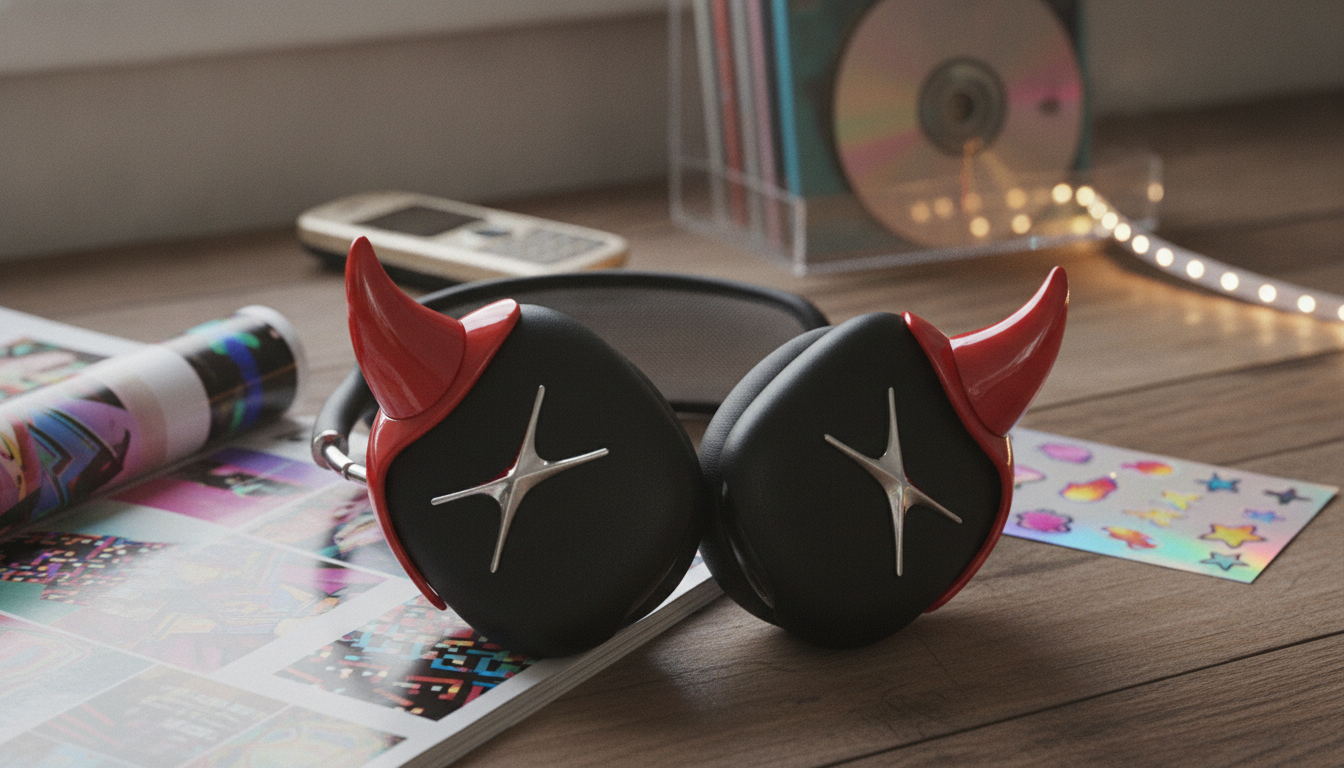
Devil Horn AirPods Max Case – Y2K Headphone Decoration for Apple
A bold, Y2K-inspired devil horn cover that dresses up AirPods Max while helping protect the ear cups from everyday scuffs. Ideal for outfit styling, photos, festivals, and daily carry—without turning premium headphones into a fragile accessory. If AirPods Max are part of your daily uniform, a playful add-on can make them feel less “factory” and more like a signature piece you actually want to bring everywhere.
What This Devil Horn Cover Adds to AirPods Max
AirPods Max already have a recognizable silhouette, but a devil horn accessory takes that familiar shape and makes it unmistakably yours. It’s designed for the sweet spot between decoration and day-to-day practicality: noticeable enough for photos and outfits, but still usable for commutes, study sessions, and errands.
- Statement look inspired by playful “devil horn” styling and early-2000s fashion aesthetics
- Helps reduce visible wear from light bumps, desk contact, and bag friction
- Designed as a decorative add-on that keeps AirPods Max recognizable and personal
- Pairs well with streetwear, cosplay-inspired looks, concert outfits, and photo-ready setups
For shoppers ready to lean into that throwback vibe, the Devil Horn AirPods Max Case – Y2K Headphone Decoration for Apple is built around the idea that headphones can be both premium audio gear and part of a look—without being treated like something too delicate to use.
At-a-Glance: Fit, Use, and Everyday Practicality
This kind of accessory tends to shine most in real-life routines—walking across campus, hopping on a train, or setting up a quick filming spot. The key is remembering it’s an add-on: it can help with surface scuffs, but it’s not a substitute for careful storage and basic cleaning.
- Best for: style-forward personalization with basic surface protection
- Typical use cases: commuting, campus, travel days, content creation, gifts
- Considerations: bulk in tight cases, cleaning needs, and maintaining access to controls
- Recommended pairing: a careful storage routine to keep the finish and mesh clean
Quick Checklist Before Buying
| Check | Why it matters | What to confirm |
|---|---|---|
| Device compatibility | Ensures the cover seats correctly and looks aligned | Intended for Apple AirPods Max |
| Control access | Avoids blocking the Digital Crown, buttons, and ports | Openings/clearances match the headphone layout |
| Storage fit | Prevents squeezing inside tight bags or hard cases | Added shape may need extra space |
| Cleaning routine | Keeps the accessory looking fresh and prevents grime transfer | Wipe regularly; avoid harsh chemicals |
| Style match | Helps the accessory complement outfits rather than clash | Choose colors/finish that fit your usual wardrobe |
Materials, Comfort, and Wear Over Time
Comfort matters because AirPods Max are often worn for long sessions—work calls, editing, gaming, and travel days. Decorative accessories should stay put without creating pressure points, snagging hair, or interfering with normal adjustments.
- Focus on a secure, stable fit that doesn’t shift during normal head movement
- Prioritize smooth edges so the cover doesn’t snag hair or clothing
- Avoid overly tight installation that could stress parts of the headphone frame
- Expect decorative accessories to show wear sooner than the headphones—plan for gentle handling
For reference on the headphones themselves—materials, layout, and official specs—Apple’s product page can be helpful: Apple — AirPods Max.
How to Install and Remove Without Hassle
A clean install makes the accessory look intentional rather than “stuck on,” and it also helps keep dust from getting trapped where it can rub over time. Take an extra minute here; it’s the difference between a snug, aligned fit and a cover that feels fussy.
- Start with clean, dry headphones to reduce slipping and trapped dust
- Align the cover carefully before pressing it into place—avoid forcing corners
- After installation, confirm free movement of the Digital Crown and button operation
- To remove, lift gradually from an edge and work around the perimeter to prevent sudden snaps
If you use a hard-shell carrying case, do a quick test-fit before heading out. Decorative shapes can add just enough bulk to make ultra-tight storage awkward—better to find that out at home than right before a commute.
Care Tips for a Clean Look (and Cleaner Headphones)
Accessories that get handled often—especially anything worn outdoors—benefit from light maintenance. Keeping the cover clean also helps keep the headphones underneath looking fresh, since oils and lint tend to collect around edges and seams.
For official cleaning guidance on AirPods and accessories, Apple Support offers straightforward do’s and don’ts: Apple Support — Cleaning AirPods and accessories.
Who It’s For (and When to Skip It)
More Apple-Friendly Accessories to Consider
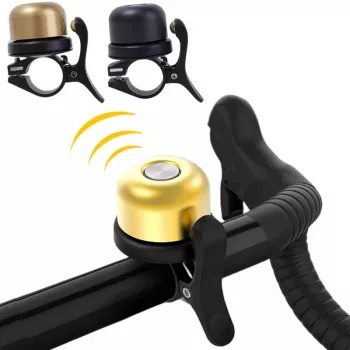
For riders who want a cleaner way to keep track of a bike, the Bike Bell with Hidden Apple Airtag Holder & Anti-Theft GPS Tracker blends in while keeping an AirTag tucked away. And if your look leans streetwear, polished staples like Tommy Hilfiger Black Leather Men’s Shoes can balance a playful accessory with a more grounded, everyday outfit.
FAQ
Does this cover fit Apple AirPods Max?
Confirm the accessory is designed specifically for AirPods Max and compare any fit notes on the product page to your exact headphone model. A correct match helps the cover sit aligned and look intentional instead of shifted.
Will it block the Digital Crown, buttons, or charging port?
After installing the cover, test the Digital Crown and button presses to ensure they move freely. A properly fitted decorative cover should keep openings and clearances aligned with the headphone layout.
How should it be cleaned?
Wipe it with a soft cloth with mild moisture, then dry it fully before placing it back on the headphones. Avoid harsh chemicals or abrasive materials that can dull the finish.
Recommended for you

Simple Solid Black Headband: Everyday Fit & Hold
Jun 28, 2026












Leave a comment