-
Shop
- Adidas
- Advanced Technologies
- AI Skills Mastery 2026 Collection
- Apple Accessories
- Best-Sellers
- Car Accessories
- Dating & Social Confidence
- Dating & Social Skills
- Digital Resources
- Education & Learning
- Family & Parenting
- Fashion
- Fashion Accessories
- Furniture
- Gadgets
- Health & Beauty
- Health & Wellness
- Home & Garden
- Home Supplies
- Kids & Babies
- Kitchen Best-Sellers
- Lighting
- Nike
- Patio, Lawn & Garden
- Personal Growth
- Pet Care
- Pet Supplies
- Pets
- Shoes
- Sport & Outdoors
- Stress Relief & Relaxation
- Summer 2025 Fashion Collection
- Sunglasses
- Super Deals
- Travel
- Travel & Outdoors
- Wealth
- Wealth Building
- Women’s Wellness & Lifestyle
- Popular
- Best deals
Apple Pencil Non‑Slip Jelly Cover: Grip & Comfort Guide
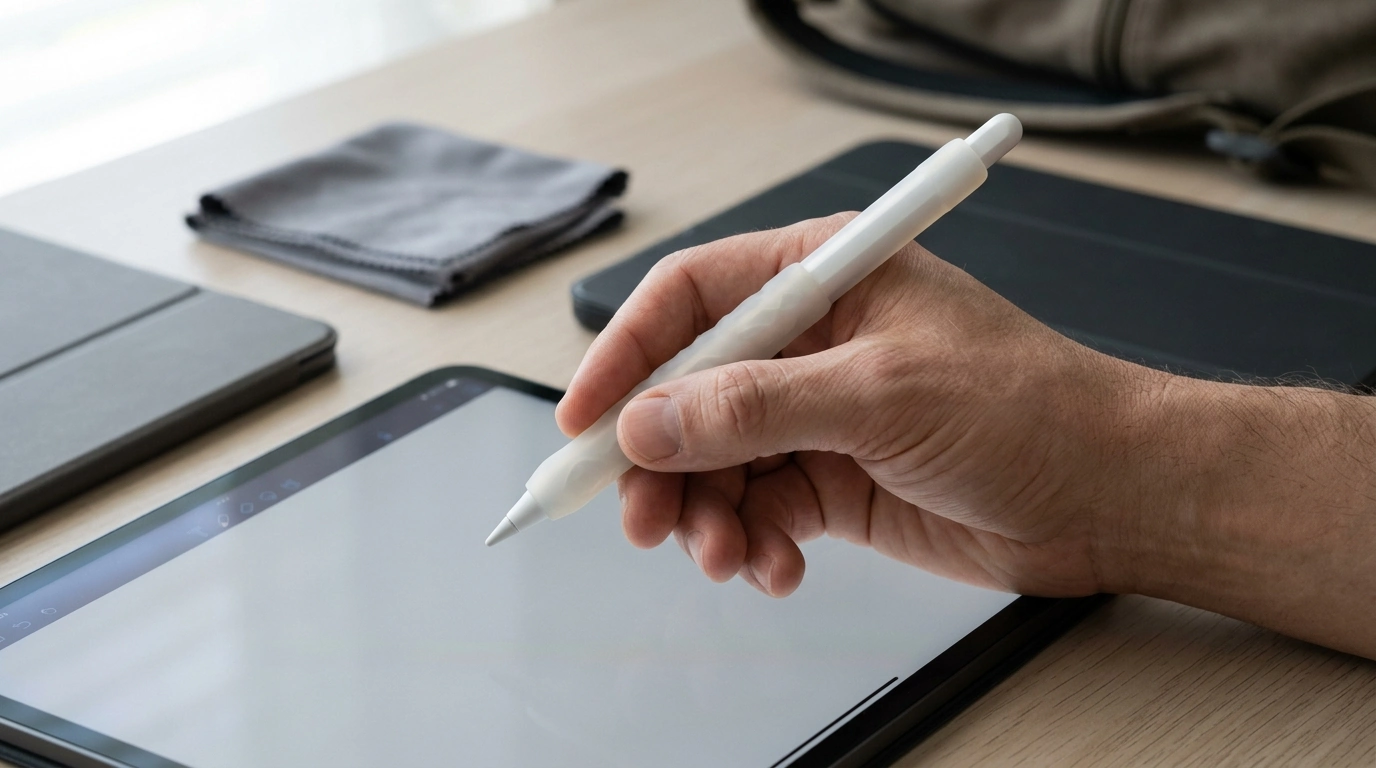
Non-Slip Jelly Cover for Apple Pencil: Better Grip, Comfort, and Everyday Protection
A slim, silicone-style sleeve can make an Apple Pencil feel more secure in the hand, especially during long note-taking sessions or detailed drawing work. By adding a slightly tackier surface, a non-slip jelly cover helps reduce slipping from dry fingertips or sweaty palms while also acting as a light buffer against scuffs and everyday cosmetic wear. Below is a practical look at what changes once a cover is on, who gets the biggest benefits, how to avoid charging and storage headaches, and how to keep the sleeve clean so it stays grippy.
What a Non-Slip Jelly Cover Changes in Daily Use
The Apple Pencil is designed to be sleek, which can also make it feel smooth and a bit “fast” in the fingers. A jelly cover changes the feel immediately by adding friction and a softer contact surface.
- More control for common tasks: A tackier finish can steady the barrel during sketching, fast notes, and PDF markups—useful when your grip shifts quickly between strokes.
- Improved comfort over time: A slightly cushioned sleeve can soften pressure points where fingers pinch, helping reduce hand fatigue during long writing sessions.
- Fewer accidental drops: Better grip security helps when moving between desk, bag, and tablet, or when you pick up the Pencil with one hand while holding your iPad in the other.
- Light everyday protection: The cover can reduce scratches and small dings from keys, zippers, and desk contact, helping the Pencil stay cleaner-looking.
- Small changes to finger placement: Depending on thickness and texture, the double-tap area (on compatible models) can feel a little different, so it may take a day or two to adjust.
Who Benefits Most
Not everyone needs a sleeve, but certain use cases tend to feel the upgrade right away.
- Students: Fast note-taking can make a smooth stylus rotate slightly in the fingers; added traction helps keep a steadier hold and can reduce fatigue.
- Artists and designers: A more “pen-like” grip can provide consistent traction for controlled line work, especially if you rotate your grip frequently.
- Commuters and travelers: In transit, it’s easy for a stylus to slip out of a shallow pocket or from a hand while standing; extra grip adds a bit of drop resistance.
- Dry-hands or sweaty-hands users: Low friction can cause slipping with dry hands, while moisture can make a smooth barrel slide—either way, a jelly cover can help.
- Anyone who finds the bare Pencil too slick: If your strokes feel less controlled because the barrel shifts, grip texture can be the simplest fix.
Fit and Compatibility Checks Before Buying
Before picking a sleeve, confirm your Apple Pencil model and your everyday setup (charging method, case type, storage habits). Apple Pencil generations differ in shape and charging approach, and a cover that feels great in hand can still be inconvenient if it interferes with charging or storage.
Quick Compatibility Checklist
| Use case | What to verify | Why it matters |
|---|---|---|
| Magnetic attachment/wireless charging | Cover thickness and cutouts around charging side | Too much material can reduce charging reliability or attachment strength |
| Tight Pencil holder in a case | New diameter with sleeve installed | A snug holder may become unusable |
| Frequent pairing/unpairing | Access to connectors/caps (model dependent) | Prevents constant removal of the sleeve |
| Long writing sessions | Grip texture and thickness preference | Comfort and control depend on feel |
It also helps to double-check Apple’s published specs for your Pencil generation so you know what charging/pairing method to accommodate. For reference, see Apple’s technical specifications for Apple Pencil (2nd generation) and Apple Pencil (1st generation).
Material Feel: Grip, Thickness, and Control
“Jelly” sleeves typically use a soft, flexible polymer that increases friction without feeling abrasive. The best feel depends on how you hold the Pencil and what you do most often.
Charging, Storage, and Everyday Carry Considerations
Cleaning and Care
For general device-safe cleaning guidance, Apple also shares best practices here: Apple Support: Clean your Apple products.
Recommended Picks (In Stock)
- Non-Slip Jelly Cover for Apple Pencil ($16.49) – A simple grip-and-comfort upgrade that also helps protect the Pencil body from scuffs and minor impacts.
- 28-Piece Natural Hair Makeup Brush Set ($67.49) – A studio-friendly set for creators who also work with traditional tools and want a complete brush lineup.
- Crime London Men’s White Leather Shoes ($170.99) – A clean everyday option for commuters who carry tech gear daily and prioritize a polished, durable look.
Product Option: Non-Slip Jelly Cover for Apple Pencil
| Item | Details |
|---|---|
| Name | Non-Slip Jelly Cover for Apple Pencil |
| Price | 16.49 USD |
| Availability | In stock |
| Product page | https://majorille.com/non-slip-jelly-cover-for-apple-pencil/ |
FAQ
Will a jelly cover stop Apple Pencil from charging magnetically on the iPad?
It depends on the sleeve’s thickness and whether it has appropriate cutouts along the charging side. Thin covers often work, but bulkier ones can weaken magnetic attachment or cause inconsistent charging—if that happens, remove the sleeve while charging.
Does a non-slip cover affect drawing accuracy or pressure control?
The nib still contacts the screen the same way, so pressure sensing and line behavior remain fundamentally unchanged. However, thickness and texture can alter hand posture; many people gain stability, while others prefer a slimmer barrel for very fine lines.
How should a jelly-style sleeve be cleaned without damaging it?
Remove the sleeve and wash it with mild soap and water, then rinse well and let it air-dry completely before reinstalling. Avoid harsh chemicals that can discolor or degrade soft polymer materials.
Recommended for you

Are Dolce & Gabbana Still a Couple Today?
Aug 14, 2026
Kids Balance Stepping Stones: 6-Piece Sensory Course
Aug 15, 2026













Leave a comment